TUI design guide #
This guide explains how fen's terminal UI is designed, not just which keys it accepts. The live key and command reference is /help inside the TUI, while this page gives maintainers and extension authors a shared vocabulary for TUI affordances.
The TUI is a full-screen termbox2 presenter built for small terminals, SSH and mosh sessions, tmux panes, and ARMv7/Raspberry-Pi-class hardware. It should feel stable, inspectable, and recoverable rather than flashy.
Design goals #
- Keep the conversation readable while the agent streams, runs tools, and accepts follow-up input.
- Make important state ambient and local to the edge of the screen instead of interrupting the transcript.
- Prefer keyboard-first interactions that also work through SSH, tmux, and mobile terminal clients.
- Use the same extension mechanisms for first-party and third-party UI contributions.
- Keep redraw, wrapping, and scan work cheap enough for slow terminals.
- Treat terminal recovery, mouse tradeoffs, and paste safety as first-class UX.
Screen model #
The TUI has a stable spatial contract. The status row is always at the top, the input region is always at the bottom, and the transcript receives the space between them. Panels reserve bounded vertical space only when they have something to show.
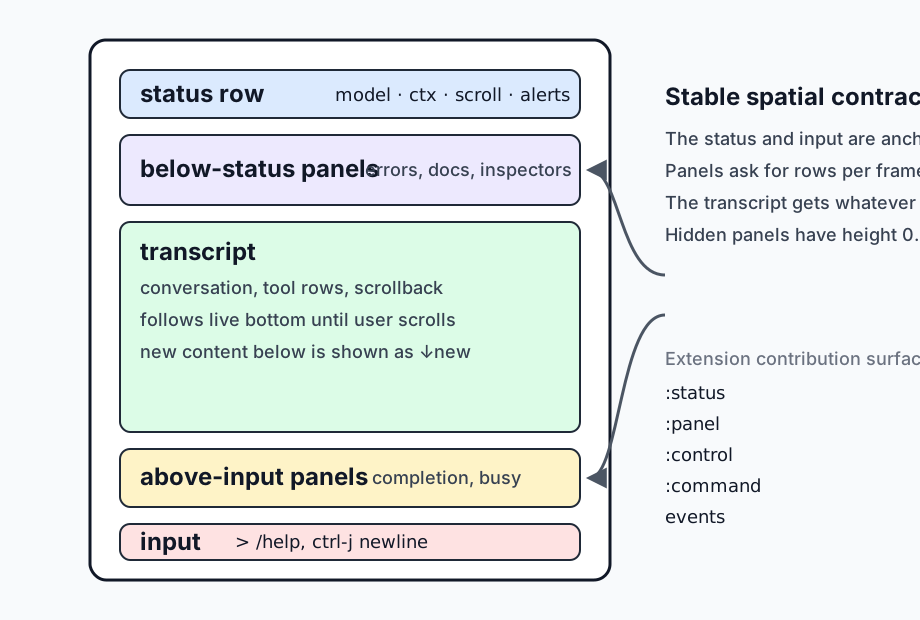
The layout walker composes registered panels every frame. :below-status panels stack downward from the status row. :above-input panels stack upward from the input region. A panel with height 0 is hidden for that frame. If panels ask for more rows than the terminal can spare, the presenter clamps them to the available budget and the transcript shrinks first.
This lets features add contextual UI without each feature learning terminal geometry. The errors panel, completion menu, busy row, queue views, and future storybook fixtures all use the same placement rules.
Workspace tabs #
Background subagent runs project into read-only workspace tabs shown in a compact single-row tab bar below the status row. The tab bar disappears when only the main session exists and truncates labels rather than requiring a wide layout. The main session tab stays leftmost, and subagent tabs are ordered most-recent first so newer work sits to the left. Alt-Right selects the next tab, and Alt-Left selects the previous tab. Alt-T opens the existing modal selector as a searchable tab list.
A running subagent tab reuses the input editor with a Steer> prompt, and Enter queues that text through the retained subagent steering mechanism without granting transcript or filesystem edit authority. A finished subagent tab changes to a non-editable Read-only> input line. Each tab keeps independent transcript scroll, selection, layout cache, input draft, cursor, and history state across switches and /reload. A subagent tab carries a close affordance: click its x, or press Ctrl-W while the tab is focused. Closing a tab only hides it; the run history remains inspectable through /subagents show, and closed tabs are not recreated by later child events. When a subagent tab is active, the status row shows that child's provider, model, and accumulated token usage instead of the main session's.
Side chat #
/btw opens or focuses a workspace tab titled btw. /btw optional initial message sends the supplied text as the side conversation's first turn. The side conversation starts with a blank message history and uses the main session's current provider and model at creation time. Its agent can use only the read-only local built-ins read, grep, find, and ls, enforced through the normal tool allowlist. When any of them remain, it also keeps the main session's hosted web search mode, so in live mode it can fetch arbitrary pages; see Hosted web search. Side turns use the same cooperative agent loop, provider streaming path, canonical event ingestion, and transcript renderer as the main session. The main and side turn coroutines advance independently on each presenter tick, so either tab remains usable while the other streams. Input in the btw tab is routed only to the side agent, and slash-prefixed text is literal side input except for /btw-use. Run /btw-use in the btw tab to replace the main tab's input draft with the side agent's last assistant reply without submitting it. The conversation exists only in the workspace record, is never appended to the main session JSONL, and survives behavior reloads while its tab remains open. Press Ctrl-W or click the tab's x to cancel any active side turn and discard the entire side conversation.
Event and contribution model #
The TUI is an adapter over the interactive runtime. The agent loop, tools, providers, slash commands, and extensions emit typed events. The TUI ingests those events into transcript rows and status side effects, then paints the current state.
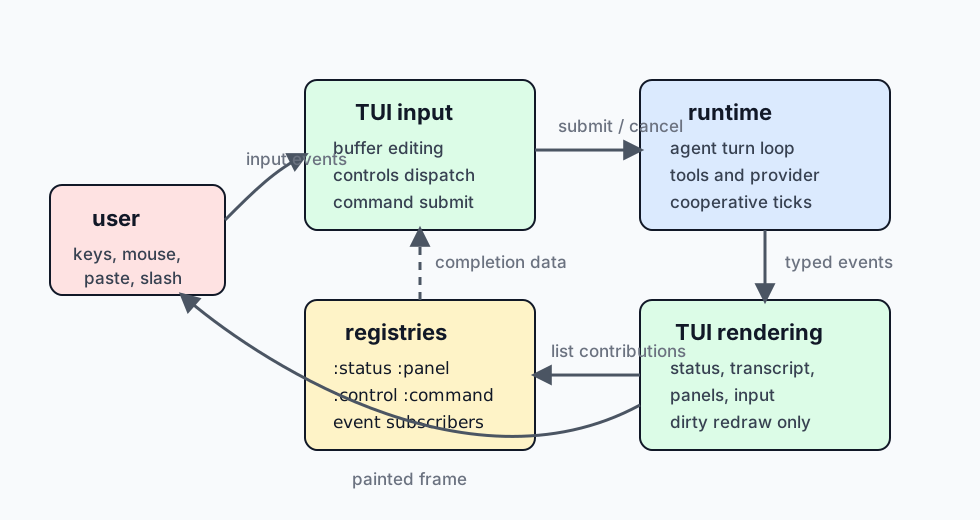
The important boundary is that features contribute through registries and events rather than by painting directly. A feature that needs ambient text contributes a :status item. A feature that needs bounded vertical space contributes a :panel. A feature that needs a keyboard affordance declares a :control. A feature that needs text entry contributes or handles a :command. A feature that wants to notify the UI emits an event.
:control is a declaration surface, not the complete key dispatcher. The declaration gives /help, /docs controls, and the static docs a live list of named controls and default keys. The TUI input layer still owns low-level key dispatch for editing, history, scrolling, paste, mouse events, and terminal recovery.
Transcript affordances #
The transcript follows the live bottom by default. When the user scrolls up, fen preserves the viewport and lets new streamed content grow below it. The status row shows how far the viewport is from the tail, whether unread content exists below, and the key that returns to the live bottom, so reading scrollback does not become a tug-of-war with streaming output.
Page Up, Page Down, and the mouse wheel move through scrollback. While the viewport is away from the live tail, a proportional one-column thumb appears at the transcript's right edge to show its position in the available history; it disappears again at the tail. ctrl-g jumps to the latest user-authored message from the live bottom, then repeats backward through older user messages. ctrl-y jumps back to the live bottom and resumes following. Page Down can also return incrementally until the scroll offset reaches zero.
Tool calls are intentionally compact. A running tool appears as tool> run ..., and a completed result folds into the matching tool> ok|err ... (metadata) row. Expanded bodies are available with /expand or ctrl-o when debugging large outputs. The default view favors scanability over dumping every tool byte into the transcript.
Assistant thinking blocks are also a view concern. They can be toggled with /thinking-blocks or ctrl-t, and the renderer keeps the same transcript events while changing how much detail is visible.
Input affordances #
The input region is a multiline editor with a stable prompt. While the main editor is empty, a dim placeholder after the prompt points at / commands, /help, and ctrl-j, shortening or clipping to fit narrow terminals and vanishing on the first keystroke. The placeholder text comes from one function, input.idle-hint, so contextual idle suggestions extend that function instead of the paint path. An extension's :hint event replaces the placeholder with its suggestion until the draft is edited, Esc, or a conversation reset, and the same suggestion never returns. Enter submits the current buffer. ctrl-j inserts a newline, which keeps accidental pasted newlines from becoming submissions. Common readline-style movement and deletion keys are supported where termbox exposes them.
Slash commands use a live completion panel. Typing / opens filter-as-you-type command completion when candidates exist. Commands can provide their own argument completion through the existing command registration surface. The completion panel is just an :above-input panel, so it follows the same geometry and clipping rules as other panels.
Input history is local to the TUI session. Up and Down move through wrapped input rows first, then fall back to history at the top or bottom of the current input. Alt-P and Alt-N provide unconditional history navigation for terminals where arrow modifiers are unreliable.
Large pastes are compacted into markers instead of flooding the editor. The marker expands back to the original paste text on submit. This keeps the TUI responsive on slow terminals while preserving the user's content.
Status row affordances #
The status row is the always-visible ambient channel. It is for small facts that help the user decide what to do next. Examples include provider and model, approximate context, queued steering or follow-up counts, scroll position, transient copy feedback, cancellation state, and version identity.
Status items are contributed through :status registrations. Each item chooses a side and an order, and the presenter composes the row. Status items should be short, width-aware, and safe to omit when idle. A status item should not become a second transcript.
Attention states should be explicit but temporary. For example, the first idle ctrl-c arms a second-press quit and appears as a status hint instead of writing another transcript line. Copy feedback is also transient, so it confirms the action without permanently consuming the row.
Panel affordances #
Panels are for contextual detail that needs more than one line but should not take over the session. They are bounded, stackable, and dismissible where appropriate. The busy panel appears above input only while the agent is thinking, retrying, or running a tool. When the row has room, it also names what the next ctrl-c will do for the displayed turn; the hint is dropped before the busy label is clipped, and it is omitted on tabs where ctrl-c would not cancel that turn. The errors panel appears below the status row so failures can be inspected without losing the current input. Completion appears closest to the input so it reads as an inline dropdown.
Panel renderers run behind error isolation. A broken panel should become a one-line panel-error:<name> row, not a crashed terminal. This is part of the UX contract for extension authors: UI contributions should be safe to experiment with during /reload.
Mouse, copy, and paste tradeoffs #
Mouse wheel scrolling is enabled by default. That requires SGR mouse reporting, which means the terminal forwards click and drag events to fen instead of doing native text selection. Fen therefore owns transcript selection when mouse capture is active. Click and drag over painted transcript text, then release to copy the selected text through OSC 52.
OSC 52 is useful because the escape travels from the remote process out to the local terminal. That means copy can work over SSH and mosh without a remote clipboard daemon, as long as the local terminal allows OSC 52. If OSC 52 is blocked or native selection is preferred, set FEN_TUI_MOUSE=0 or one of off, false, or no. That restores terminal-native drag selection and copy at the cost of mouse-wheel scrolling. Page Up and Page Down still scroll.
Bracketed paste is enabled while the TUI owns the terminal. This lets fen distinguish pasted newlines from submit keystrokes. On shutdown or suspend, bracketed paste is disabled so the shell returns to normal behavior.
Recovery affordances #
The TUI assumes terminals can get corrupted. Another process may write to the tty, tmux may glitch during resize, or a terminal may desynchronize its front buffer. ctrl-l and /redraw request a hard refresh that reasserts terminal modes, clears render caches, blank-presents, and repaints the frame. The scroll position and input buffer are preserved.
ctrl-z suspends fen like a normal full-screen terminal program. The TUI leaves raw mode and disables bracketed paste before stopping, then reinitializes and repaints after fg resumes the process. This makes suspend a recovery path as well as a shell escape hatch.
Cancellation is also staged. During a busy turn, the first ctrl-c requests cooperative cancellation. A second ctrl-c while still busy force-quits, so the user always has an escape path even if a provider or tool is slow to yield. The busy row switches from the cancel action to the force-quit action after the first press, so the ladder is visible without consulting /help.
Performance model #
The presenter redraws only when dirty or forced. Streaming assistant deltas are coalesced before invalidating the transcript renderer. The current stream invalidation threshold is 128 pending bytes (with an immediate first-delta redraw and a final stream-end flush), not a maximum elapsed-time deadline. Active cooperative work is polled every 30 ms; clean idle loops use 300 ms, and a terminal key can wake either poll early. Small slow deltas may therefore remain invisible across unrelated input redraws while the streamed row's rendered cache is still valid. make bench-tui-latency measures this baseline through the real production loop with scheduled input and captured presented frames; see latency benchmark methodology and limits. Historical transcript rows cache their rendered form by width and view toggles. Deep scroll uses an indexed layout cache instead of walking from the tail through every skipped row.
Low-level drawing favors row prints over per-cell writes where possible. This matters on ARM terminals because Lua-to-C call count is visible during redraw. The Markdown renderer and clipping functions intentionally use approximate terminal width rules rather than expensive Unicode layout. They avoid cutting UTF-8 bytes mid-character, but wide CJK and combining marks are still approximated.
These choices are part of the UX. A slightly simpler renderer that stays responsive on the target hardware is better than a richer renderer that stalls while the model streams.
Reload and extension authoring #
Persistent TUI state lives in fen.extensions.tui.state. Rendering, input handling, ingestion, selection, completion, and panel behavior live in reloadable sibling modules. During development, /reload refreshes behavior without losing the terminal lifecycle, transcript, scroll position, input buffer, or open panel state.
Extension authors should use the public contribution surfaces documented in Extensions. Use :status for one-line ambient state. Use :panel for bounded vertical UI. Use :control to document a keyboard affordance. Use :command for explicit slash-command entry points. Use events to communicate with the presenter instead of importing TUI modules directly.
Testing and stories #
Most TUI logic can be tested without a real terminal. packages/testing/src/fen/testing/tui.fnl installs a termbox2 stub and resets persistent TUI state for focused tests. Existing tests cover layout, input, completion, transcript rendering, selection, clipboard, Markdown, and PTY smoke behavior.
The planned storybook-style direction is to add reusable TUI story fixtures, a virtual screen capture stub, golden frame tests, and an interactive terminal story runner. Story fixtures should seed common states such as idle input, busy tool calls, completion, scrolled transcript, errors, and narrow status. The same stories should support both visual inspection and automated whole-frame assertions.
That direction keeps the TUI docs, tests, and UX work aligned. A design claim on this page should eventually have either a focused unit test, a story fixture, or both.
Related references #
- Architecture notes for the presenter adapter and reloadable microkernel model.
- Extensions for
:status,:panel,:control,:command, and event contracts. - Runtime
/helpfor live commands and controls. - Runtime
/docs controls,/docs status, and/docs panelsfor live registry views.